Guide
Why doesn't UFW block Docker's published ports?
Docker diverts traffic for a published port before it reaches the chain UFW filters, so `ufw deny 8080` is decoration. The fix depends on who should reach the port, and any rule you do write has to name the container's port, not the one you published.
Why doesn't UFW block Docker's published ports?
Because Docker rewrites the destination of a packet for a published port in the nat table, before routing, so the packet is forwarded to the container through the FORWARD chain and never reaches INPUT, where UFW's rules live. The fix that always holds is to publish nothing and let a reverse proxy reach containers over a Docker network, or to publish to 127.0.0.1 on Docker 28.0 or later. If a port must be public but filtered, write the rule in DOCKER-USER or as a ufw route rule, and match the container's port, not the host port.
Because Docker Engine rewrites the packet before UFW ever looks at it. Traffic for a published port is redirected to the container's address in the nat table, so the kernel forwards it through the FORWARD chain instead of delivering it to the host through INPUT, which is where UFW keeps its rules. ufw deny 8080 is a correct rule in a chain the packet never visits. The fix that always holds is to publish nothing, or to publish to 127.0.0.1 on Docker 28.0 or later. If a port has to stay public but filtered, the rule goes in DOCKER-USER, and it has to name the container's port.
Two answers circulate, and only one is right#
Search this and you will find two camps. One says UFW is fine and you just need the right ufw allow and ufw deny lines. The other says Docker and UFW are incompatible, so set "iptables": false in /etc/docker/daemon.json and let UFW take over.
The first is wrong in a way that is easy to verify: Docker's own documentation states that "packets are diverted before it reaches the INPUT and OUTPUT chains that ufw uses." No UFW rule written for the host can catch them.
The second is wrong in a way that hurts later. Docker's documentation says "iptables": false "is not appropriate for most users, it is likely to break container networking." You end up maintaining by hand the rules Docker was maintaining for you. It persists because it does make the published port disappear, which is the only thing people test.
The real answer is that UFW is the wrong layer for container ports. Decide who should reach each port, and enforce that where Docker looks.
Where the packet actually goes#
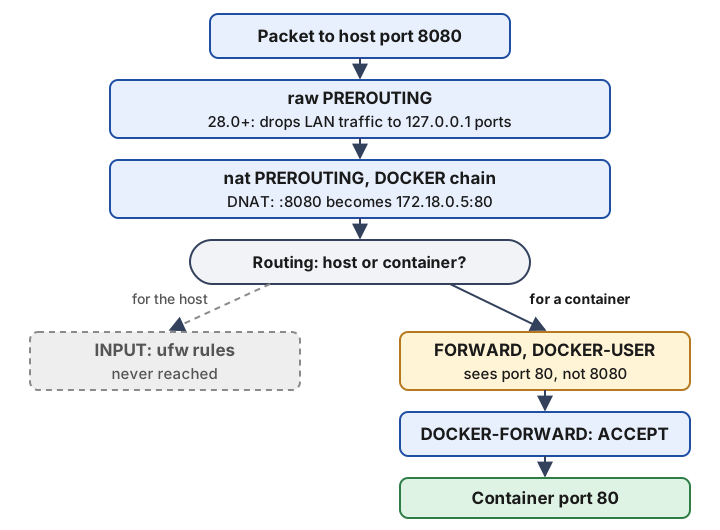
This is what it looks like on a real host. On Docker Engine 28.1.1, with a container published as 127.0.0.1:8088:8080, the relevant rules read:
# filter table: Docker's jumps sit at the top of FORWARD
-A FORWARD -j DOCKER-USER
-A FORWARD -j DOCKER-FORWARD

# nat table: the rewrite, before routing
-A PREROUTING -m addrtype --dst-type LOCAL -j DOCKER
-A DOCKER -d 127.0.0.1/32 ! -i br-8453e0487b5f -p tcp -m tcp --dport 8088 -j DNAT --to-destination 172.26.0.2:8080

# raw table: the 28.0 protection for loopback-published ports
-A PREROUTING -d 127.0.0.1/32 ! -i lo -p tcp -m tcp --dport 8088 -j DROP
Three things to read off it. The DNAT happens in PREROUTING, before the kernel decides whether the packet is for the host. DOCKER-USER is the first thing FORWARD calls, and it is empty by default (a single RETURN). And Docker's own ACCEPT rules in the DOCKER chain match the container's address and the container's port, 8080 here, not the published 8088.
That last point is the one that catches people who try to fix this by hand.
The port number your rule has to use#
Docker's documentation describes DOCKER-USER as a placeholder for rules "processed before rules in the DOCKER-FORWARD and DOCKER chains." It is the right place for a filter. But by the time a packet reaches it, the destination has already been rewritten. With -p 8080:80, DOCKER-USER sees port 80.
So this rule, which looks correct, never matches:
# wrong: 8080 no longer exists by the time FORWARD runs
iptables -I DOCKER-USER -p tcp --dport 8080 -j DROP
Either match the container port, or match the original destination through conntrack, which is the form Docker documents:
# allow only 192.0.2.0/24 to reach anything published, on the external interface
iptables -I DOCKER-USER -i eth0 ! -s 192.0.2.0/24 -j DROP

# match the port the client actually connected to
iptables -I DOCKER-USER -p tcp -m conntrack --ctorigdstport 8080 -j DROP
Docker warns that the conntrack extension "may result in degraded performance". On a home server that is not the constraint; on a busy reverse proxy it might be. Rules added with iptables -I are also gone after a reboot unless you persist them, which is the main reason people reach for ufw-docker instead.
The ufw-docker README makes the same point in UFW's syntax. To expose a container started with -p 8080:80, you write ufw route allow proto tcp from any to any port 80, the container port. A ufw route rule is UFW's form for forwarded traffic; its manual page says rules for traffic "not destined for the host itself" need the route keyword. A plain ufw allow is for the host.
Five fixes, compared#
| Fix | Blocks the internet | Blocks your LAN | Relies on DOCKER-USER | What it costs |
|---|---|---|---|---|
| Publish nothing, proxy over a Docker network | Yes | Yes | No | Every web app goes through the proxy |
Publish to 127.0.0.1 | Yes | Yes on Engine 28.0+, not before | No | Only the host can connect |
DOCKER-USER rules by hand | What you write | What you write | Yes | Container-port matching, persistence is yours |
| ufw-docker | Yes, unless you ufw route allow | No, private ranges are let through | Yes | One more script to trust and update |
"iptables": false | Yes | Yes | No | Breaks container networking |
Publish nothing#
The default that removes the problem rather than managing it. Services join a shared external network, Caddy or Traefik joins the same network, and the proxy reaches each app by container name. The only published ports on the machine are 80 and 443 on the proxy itself. Docker Compose conventions has the compose layout, and Reverse proxy and TLS the proxy side. Databases, caches and workers stay on each stack's private network, where nothing outside the stack can reach them.
This is also the only fix that does not depend on which firewall backend Docker uses, which matters below.
Publish to 127.0.0.1#
For anything only the host should reach, such as a web app behind a reverse proxy that runs on the host rather than in a container:
services:
  app:
    ports:
      - "127.0.0.1:8080:80"
Without an address, Docker publishes "to all host addresses (0.0.0.0 and [::])", IPv6 included. Docker's documentation is direct about it: "Publishing container ports is insecure by default."
There is a version line here that most guides miss. Docker's documentation says that "in releases older than 28.0.0, hosts within the same L2 segment (for example, hosts connected to the same network switch) can reach ports published to localhost." The 28.0.0 release notes, dated 19 February 2025, list it as a security fix. On a current engine it is the raw table DROP rule shown above. If docker version reports anything older, a 127.0.0.1 binding protects you from the internet but not from the next machine on your switch. An update strategy that does not lose data covers getting the engine itself current.
You can make loopback the default instead of remembering it per service, but there are two settings, not one. "ip": "127.0.0.1" in daemon.json changes the default bind address only for the default bridge network. Compose creates user-defined networks, which need the bridge driver option:
{
  "ip": "127.0.0.1",
  "default-network-opts": {
    "bridge": {
      "com.docker.network.bridge.host_binding_ipv4": "127.0.0.1"
    }
  }
}
Restart the daemon, and recreate existing compose networks with docker compose down and up, since it is an option set when a network is created. After that, a port you do want public has to say so: 0.0.0.0:443:443.
ufw-docker, and the hole it leaves on purpose#
ufw-docker adds a block to /etc/ufw/after.rules that fills DOCKER-USER with rules, so UFW's route rules govern container ports. It works for a VPS. It is weaker than people assume on a home network, because its rules begin with:
-A DOCKER-USER -j RETURN -s 10.0.0.0/8
-A DOCKER-USER -j RETURN -s 172.16.0.0/12
-A DOCKER-USER -j RETURN -s 192.168.0.0/16
RETURN hands the packet back to Docker's own rules, which accept it. So any client with a private source address reaches every published port, whatever your UFW rules say. That is deliberate, so containers and the local network keep working, and on a VPS it means "the internet is filtered". On a home server, where the clients that worry you are a compromised laptop or an IoT device on 192.168.1.0/24, ufw-docker does not filter them at all.
If you use it: ufw-docker check shows what it would change, ufw-docker install writes the rules, and ufw-docker allow <container> 80 opens a container port, again the container's port. The README advises a reboot if the rules do not take effect after restarting UFW.
What changes with Docker 29 and nftables#
Docker 29.0.0 (10 November 2025) added an nftables firewall backend, enabled with "firewall-backend": "nftables". Its documentation still calls it experimental, with "configuration options, behavior and implementation" subject to change, and 29.9.0 (8 October 2026) is the current release.
The detail that matters here: in nftables mode there is no DOCKER-USER chain. Docker's replacement is your own nftables table with base chains at the same hook points, plus --bridge-accept-fwmark for packets you want Docker's drop rules to let through. Hand-written DOCKER-USER rules and ufw-docker are recipes for the iptables backend. The backend also cannot be enabled in Swarm mode, and it will not turn on IP forwarding for you the way the iptables backend does.
So if you depend on a DOCKER-USER recipe, stay on the default iptables backend. If you used the first two fixes, the backend makes no difference to you, which is the strongest argument for them. Even on iptables, 29.0.0 updated Docker's bridge rules and removed the DOCKER-ISOLATION-STAGE-1 and -2 chains, so a script that names Docker's internal chains, rather than only DOCKER-USER, should be checked after the upgrade.
Which fix for which situation#
- A web app behind a reverse proxy in Docker. Publish nothing.
- Something only the host itself talks to.
127.0.0.1:port, on Engine 28.0 or later. - A VPS with ports that must be public to some sources.
DOCKER-USERrules by source address, or ufw-docker if you want UFW syntax. - A home server where LAN devices are the concern. Publish nothing, or write
DOCKER-USERrules yourself. ufw-docker exempts your LAN by design. - You want remote access without opening anything. Do not publish to the internet at all; Remote access without port forwarding covers the overlay network route.
The same mechanism explains a neighboring puzzle. Fail2ban writes its bans with iptables-multiport into INPUT, so it bans an address that keeps reaching a containerized service anyway. CrowdSec vs Fail2ban covers what to use instead.
When this answer stops applying#
- Rootless Docker and Podman. Nothing here was checked against them. Docker vs Podman covers the differences that are documented.
- The nftables backend. Experimental, and Docker says its behavior may change. Re-read its page before building on it.
network_mode: host. The container uses the host's network stack directly, there is no DNAT, and UFW'sINPUTrules do apply to it.
What to do next#
List what you actually expose before changing anything:
docker ps --format '{{.Names}}\t{{.Ports}}'
sudo ss -tlnp | grep docker-proxy
Any line showing 0.0.0.0: or [::]: is reachable from wherever the host is reachable, whatever ufw status says. Move each to the proxy network or to 127.0.0.1, and use the Port conflict checker to catch collisions while you rearrange them. Then work through the rest of A security baseline for a home server, which ranks this second only to SSH keys.
Questions#
Does ufw deny work on a Docker published port?
No. ufw deny 8080 writes a rule for traffic addressed to the host, which is filtered in the INPUT chain. A packet for a published port is rewritten to the container's address in the nat table first, so it is routed through FORWARD instead and never meets the rule. The ufw-docker project's own README says the same: even ufw deny 8080 will not prevent external access. The rule is not wrong, it is just in a chain the packet never visits.
Should I set iptables to false in daemon.json to fix UFW?
No. Docker's documentation says setting "iptables": false prevents Docker creating most of its firewall rules, is not appropriate for most users, and is likely to break container networking. You trade an exposure you can fix with one line of compose for containers that cannot reach the internet or each other until you rebuild the NAT rules by hand. The ufw-docker project also tells you to leave Docker's iptables management on.
Is binding a port to 127.0.0.1 safe?
On Docker Engine 28.0.0 or later, yes: only the host itself can connect. Before 28.0.0 it was not quite true. Docker's documentation says hosts on the same layer 2 segment, such as machines on the same switch, could reach ports published to localhost, and the 28.0.0 release notes list the fix. Check docker version before you rely on it. On a current engine you can see the protection as DROP rules for 127.0.0.1 in the raw table's PREROUTING chain.
Why does my DOCKER-USER rule for port 8080 not match?
Because by the time a packet reaches DOCKER-USER its destination has already been rewritten to the container's address and port. With -p 8080:80, the chain sees port 80. Write the rule against the container port, or match the original destination with the conntrack module (-m conntrack --ctorigdstport 8080), which Docker documents with a warning that it may degrade performance. The same applies to ufw route rules created for ufw-docker.
Does firewalld have the same problem as UFW?
It has a different version of it. When firewalld is running, Docker creates a firewalld zone called docker with target ACCEPT, puts its bridge interfaces in it, and adds a docker-forwarding policy that allows forwarding from any zone into that zone. So a published port is still reachable regardless of what your public zone says. The same fixes apply: publish nothing, publish to loopback, or filter in DOCKER-USER.
Does Docker's nftables backend fix UFW?
No, and it removes one of the fixes. The nftables backend arrived in Docker 29.0.0 as experimental and is still documented that way. In nftables mode there is no DOCKER-USER chain; Docker tells you to put your own rules in a separate nftables table with base chains on the same hooks. Every recipe built on DOCKER-USER, including ufw-docker, was written for the iptables backend, which is still the default.
Sources#
- Docker docs, packet filtering and firewalls (UFW, firewalld, disabling iptables)
- Docker docs, iptables: DOCKER-USER chain, conntrack matching, direct routing
- Docker docs, nftables backend (experimental)
- Docker docs, port publishing and default bind address
- Docker Engine 28 release notes
- Docker Engine 29 release notes
- chaifeng/ufw-docker, README and after.rules
- Ubuntu manual page, ufw(8): route rules and default policies
Published . Last reviewed . Found something out of date? Tell us and we will fix it and log the change.